One key darkens the screen. Your work keeps running.
Your render finishes. Your download lands. Your AI agent keeps working. When you want it, one keystroke darkens the display without the PC going to sleep.
Windows can be unreliable, as are many utilities that are supposed to solve a simple problem. KiT runs from a single file — privately, securely, efficiently and reliably — to keep your PC awake.
Light · PC and screen stay awake. Your export keeps going.
Try it: click the bar, then press LNO. In the app: Ctrl+Shift+D Light, Ctrl+Shift+K Night, hold either for Off. Night here plays six seconds of Cosmos, recorded from KiT as it ran.
Night faces
Dark doesn't have to be dead.
Pick a face for Night, or let Random choose one each time. Every clip here is six seconds of KiT left to play on its own and recorded as it drew: nothing placed, nothing timed. No two Nights play out alike.
Cosmos
A living field of cosmic anomalous marbles, generated as it runs. Three moments from one Night left to run on its own:
A marble bursts into a supernova and its ring spreads out across the glassKit Commander leads a line of marbles on his crusadeA planet falls into the home well as a small sun arrives
What can happen
A new deep sky every Night: a Milky Way, nebulae and small galaxies, never the same twice
Gravity wells that feed, fling and grow, in ten looks
Event holes that drift in and eat what they catch
UFOs that lock on, charge and warp
Kit Commander gathering a retinue
Supernovas in nine shapes and eight colours
Storms of five kinds: plasma, ion, magneto, aether and flare
Suns, moons, planets, kittens and Offer trains
SlitherA night train flattens its meadow until a disaster takes the field, then the world slides on to fresh grass.Five disasters, one at random each time: wildfire, flood, twister, meteor or blizzard.Shown: a flood sweeps the meadow, washes the grass away and turns the train blueOrbitAn orrery: nested rings on a brass dial, the outer ones sweeping slower.Now and then the rings draw in, scatter across the lake and come home again.Shown: the rings draw in to the centre, then scatter across the lakeDVDThe KiT mark drifts from wall to wall.A new colour on every wall, a flare on the rare corner, and it keeps count.Shown: a close-up of the mark drifting between walls
Each one is its own quiet world — always moving, so nothing burns in. Or pick Monitor off, and Night turns the displays off to save power. Night covers every monitor.
Sound familiar?
Windows sleeps on the job. KiT doesn't let it.
Developers & AI builders
“The agent stopped at step 14.”
You left a long build or an AI agent running, and came back to a sleeping PC and a dropped session.
Light keeps the machine and the session awake until you say so.
Creators
“The export died at 62%.”
Renders, exports and uploads that take longer than your power plan's patience.
Light for the long haul, Night if you'd rather not watch it.
Gamers & big downloads
“80 GB, paused overnight.”
You queued the update before bed. Windows went to sleep ten minutes later.
Night darkens the display and the download keeps going.
Night owls & shared rooms
“The monitor lights up the whole room.”
Turning the screen off means hunting for buttons, and sleep kills whatever was running.
One chord to Night. Touch the mouse and you're back.
Mouse jigglers fake input to fool Windows, and IT notices. KiT asks Windows to stay awake the proper way, and never presses a key or moves your pointer.
How it works
Three modes. One gesture each.
A slim bar above the taskbar shows the one thing that matters: which mode you're in.
Light
PC and screen stay awake. Quiet and ready.
Ctrl+Shift+D
Night
Screen goes dark, the machine keeps working. A touch brings you back.
Ctrl+Shift+K
Off
Ordinary Windows, sleep and all.
Hold either chord
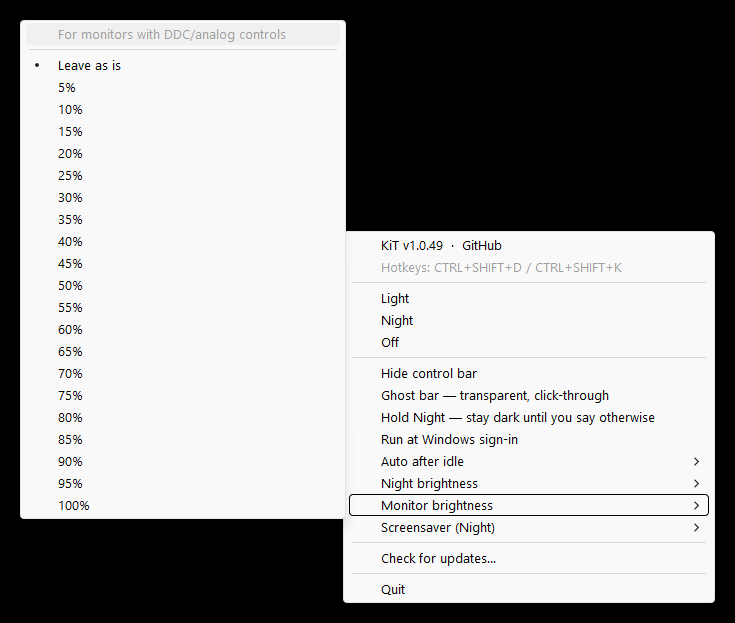
The whole settings panel is one right-click.
Set it once, then forget it
Auto after idleKicks in by itself after 1, 5, 10, 15 or 30 idle minutes.
Hold NightStay dark until you press Esc, Space or the hotkey.
Ghost barTransparent and click-through: visible, never in the way.
Double-tap to flipLight to Night and back, without looking.
Night & monitor brightnessChoose how dark Night goes, and set the panel itself on monitors that allow it.
Run at sign-inReady the moment you log in.
Trust
Small, local, and honest about it.
21 MB
One program. Nothing else to install.
0
Accounts, cloud services, or telemetry.
No admin
Installs for you alone, or runs from any folder.
SHA-256
A digest beside every download.
It does
Ask Windows to keep the session and screen awake
Offer global chords for Light, Night, Off and flip, never a record of what you type
Check for updates only when you click Check for updates…
It never
Records keystrokes or reads the clipboard
Moves the mouse or presses keys
Calls home, or touches the network on its own
The full account, in the maker's words: TRUST.md. Free to use under the KiT License.
Get KiT
Running in under a minute.
Windows 10 (1809+) or 11, 64-bit. Current release v1.1.5, published .
Listed in the Windows Package Manager catalogue, Microsoft's own, since 23 September 2026.
Check a download in PowerShell with Get-FileHash .\KIT-Setup.exe and compare it with the .sha256 file on the release page. More install paths: Download · README on GitHub.
FAQ
Short answers.
Is it really free?
Yes. No account, no tier, nothing to unlock. It's closed-source freeware; the license says exactly what that means.
How is Night different from turning the monitor off?
Night keeps the machine working while every display goes dark, with no buttons to find. A touch of the mouse or keyboard brings you straight back, or Hold Night keeps it dark until you press Esc or Space. To save power, pick Monitor off in the tray's Screensaver (Night) menu: Night then turns the displays off, and a touch still brings them back.
Will my PC still lock or sleep when I want it to?
Yes. Switch to Off, or hold either chord, and Windows goes back to its own power settings.
Windows SmartScreen warned me. Is the file bad?
Windows looks twice at new publishers; that's ordinary, not a verdict. Compare the SHA-256 digest with the one on the release page if you want certainty.
How do I remove it completely?
Uninstall from Settings → Apps, or turn off Run at sign-in and delete the portable file. Settings live in %LOCALAPPDATA%\KiT (%LOCALAPPDATA%\KiD if you ran it under its earlier name); delete that folder for a clean slate.
Keep it Ticking.
Hassle-free screen blackout and awake modes that keep your PC, Apps & AI ticking.